Enterprise Session Management: Multi-Device Revocation and Step-Up Authentication
A technical guide to implementing dual-token sliding windows, multi-device tracking, and instant global session revocation in distributed cloud systems.
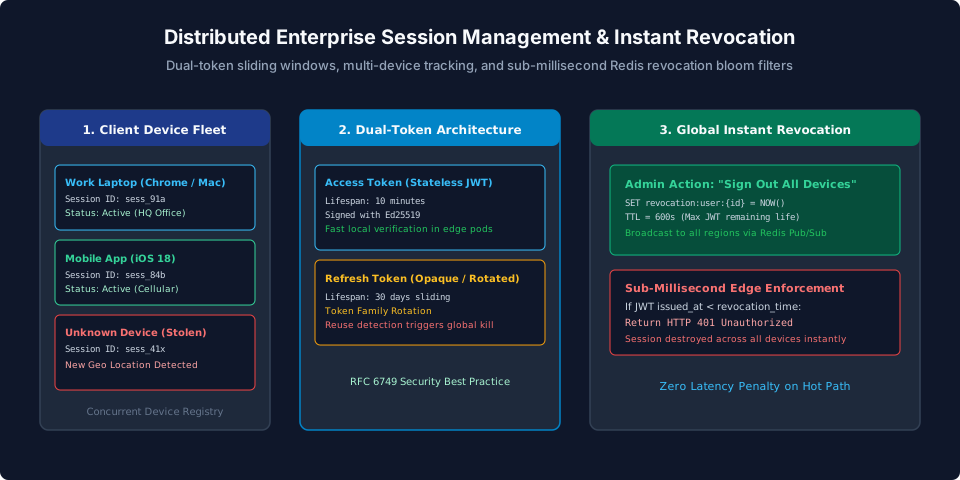
When building modern web applications, software engineers frequently turn to JSON Web Tokens (JWTs) for user session authentication. The promise of "stateless authentication"—where an application server verifies a cryptographic signature locally without querying a central database—sounds ideal for scaling microservices.
In enterprise enterprise cloud platform, however, pure stateless authentication is an acute operational hazard:
- An employee's work laptop is stolen in an airport: how does corporate IT revoke that specific laptop's session without forcing the employee to re-login on their desktop?
- A disgruntled administrator is terminated: how do you immediately cut off their access across 20 global microservice instances?
- A user changes their password: why does their old session token continue working for another three days?
With purely stateless JWTs, you cannot revoke a session before its cryptographic expiration time. If a token is valid for 7 days, an attacker who steals that token has 7 days of unfettered access.
To satisfy SOC 2 and ISO 27001 requirements while maintaining high-speed edge verification, modern cloud architectures deploy the Dual-Token Sliding Window Pattern paired with Redis Revocation Blacklists. This guide walks through building an enterprise-grade session management and multi-device revocation system.
The Dual-Token Sliding Window Pattern
Rather than issuing a single long-lived token, split session credentials into two asymmetric tokens:
[ Client Browser (Secure, HttpOnly Cookies) ]
         |
    +----+----+
    |         |
1. Access Token (Stateless JWT)         2. Refresh Token (Opaque Hash)
• Lifespan: 5 – 10 Minutes             • Lifespan: 30 Days (Sliding Window)
• Validated locally in RAM via Ed25519 • Stored in Redis with Device Metadata
• Carries User ID, Tenant, Roles       • Rotated on every single exchange
• Rejection via Revocation Blacklist   • Invalidation terminates session
- Short-Lived Access Token (JWT): Carries the authenticated user's ID, tenant ID, and permissions. It expires every 5 to 10 minutes. Edge services verify the token's cryptographic signature locally without querying a database.
- Rotating Refresh Token (Opaque): A cryptographically secure 256-bit random string stored in Redis. It is used solely to obtain a fresh Access Token when the short-lived token expires.
Refresh Token Rotation with Reuse Detection (RFC 6749)
To prevent an attacker from stealing and indefinitely using a refresh token, enforce Refresh Token Family Rotation:
Every time a refresh token is presented to /api/v1/auth/refresh:
- The server marks the presented token as consumed.
- The server issues a brand-new refresh token belonging to the same Family ID.
- If a request arrives presenting an already-consumed refresh token, the server concludes that token theft has occurred (either the attacker or the victim is attempting to reuse an invalidated credential).
- The server immediately revokes the entire token family, destroying all active sessions across all devices for that user.
type RefreshTokenRecord struct {
	FamilyID  string    `json:"family_id"`
	UserID    string    `json:"user_id"`
	TenantID  string    `json:"tenant_id"`
	DeviceID  string    `json:"device_id"`
	IsConsumed bool     `json:"is_consumed"`
	ExpiresAt time.Time `json:"expires_at"`
}

func (s *AuthService) RotateRefreshToken(ctx context.Context, tokenHash string) (*TokenPair, error) {
	record, err := s.store.GetRefreshToken(ctx, tokenHash)
	if err != nil {
		return nil, errors.New("invalid refresh token")
	}

	// AUTOMATED THEFT DETECTION:
	if record.IsConsumed {
		// Token was already used! Compromise detected.
		// Kill all sessions in this family immediately!
		_ = s.store.RevokeFamily(ctx, record.FamilyID)
		return nil, errors.New("security alert: compromised refresh token detected; all sessions revoked")
	}

	// Mark current token consumed
	record.IsConsumed = true
	_ = s.store.Save(ctx, tokenHash, record)

	// Issue new token in same family
	newRefreshToken := GenerateSecureRandomToken()
	// Issue new 10-minute access JWT
	newAccessToken := GenerateJWT(record.UserID, record.TenantID)

	return &TokenPair{Access: newAccessToken, Refresh: newRefreshToken}, nil
}
Instant Global Session Revocation in Redis
What if an administrator needs to revoke access immediately, without waiting for the 10-minute access token to expire naturally?
Store a single Unix timestamp in Redis whenever an account is reset or revoked:
Key: revocation:user:{user_id}
Value: 1727145300 (Epoch seconds when "Sign out all" was clicked)
TTL: 600 seconds (Matching maximum JWT lifespan)
In your API gateway middleware, compare the JWT's iat (Issued At) claim against this single Redis key:
func VerifySessionMiddleware(rdb *redis.Client) func(http.Handler) http.Handler {
	return func(next http.Handler) http.Handler {
		return http.HandlerFunc(func(w http.ResponseWriter, r *http.Request) {
			tokenString := extractBearerToken(r)
			claims, err := parseAndVerifyJWT(tokenString)
			if err != nil {
				http.Error(w, "Unauthorized", http.StatusUnauthorized)
				return
			}

			// Check global user revocation timestamp in Redis
			key := fmt.Sprintf("revocation:user:%s", claims.UserID)
			revokedAtStr, err := rdb.Get(r.Context(), key).Result()
			if err == nil {
				revokedAt, _ := strconv.ParseInt(revokedAtStr, 10, 64)
				// If JWT was issued BEFORE the revocation button was clicked:
				if claims.IssuedAt.Unix() <= revokedAt {
					http.Error(w, "Session has been revoked", http.StatusUnauthorized)
					return
				}
			}

			// Session is completely valid
			ctx := context.WithValue(r.Context(), "user_claims", claims)
			next.ServeHTTP(w, r.WithContext(ctx))
		})
	}
}
Because the Redis key has an automatic 10-minute TTL (the exact lifespan of the JWT), the key automatically cleans itself up after all in-flight JWTs have expired naturally. Redis memory consumption remains negligible.
Multi-Device Session Management Registry
Enterprise users expect a "Security Settings" screen showing all currently active devices:
| Device | Browser / OS | Location | Last Active | Action |
|---|---|---|---|---|
| MacBook Pro 16" | Chrome 129 / macOS | Chicago, US | 2 minutes ago (Current) | Active |
| iPhone 15 Pro | Mobile App / iOS 18 | Chicago, US | 4 hours ago | [Revoke] |
| Windows PC | Edge 128 / Windows 11 | London, UK | 3 days ago | [Revoke] |
To power this UI, associate each active refresh token with metadata extracted from the client's HTTP request:
device_id: Generated client identifier.user_agent: Normalized browser/OS string.ip_address: Coarse geolocation (City, Country).last_seen_at: Updated during refresh token exchange.
When a user clicks Revoke next to their iPhone session, the server deletes that specific refresh token from Redis. The next time the phone attempts to exchange its token, the request is rejected, cleanly logging the device out.
Summary Checklist for Production
- Cap Access Tokens at 10 Minutes: Never issue stateless JWTs with multi-hour lifespans.
- Enforce Token Family Rotation: Invalidate the entire session family if an already-consumed refresh token is presented.
- Deploy Revocation Timestamps in Redis: Check
claims.IssuedAt <= revocationTimestampin edge middleware. - Store Tokens in Secure HttpOnly Cookies: Never expose sensitive session credentials to JavaScript
localStorage. - Require Step-Up Authentication: Challenge users for password or MFA confirmation before modifying billing or security keys.
Frequently Asked Questions
Why shouldn't session access tokens last for 24 hours or longer?
If a stateless access token lasts 24 hours, an attacker who steals that token via XSS or network eavesdropping retains full access for 24 hours, completely immune to password resets or administrator account bans.
What happens if a user clicks 'Sign Out of All Devices'?
Your server records the current UTC timestamp in Redis under `revocation:user:{id}`. Any in-flight JWT whose `iat` (issued at) timestamp is older than this revocation timestamp is immediately rejected by middleware.
Where should session tokens be stored in the browser?
Never store session tokens in localStorage or sessionStorage, where they are vulnerable to Cross-Site Scripting (XSS). Store tokens in Secure, HttpOnly, SameSite=Lax browser cookies.
How does refresh token family rotation detect token theft?
Each time a refresh token is exchanged, it is invalidated and replaced by a new child token in the same family. If an attacker and a legitimate user both attempt to use the same token, the server detects the reuse and invalidates the entire token family.
What is Step-Up Authentication?
Step-up authentication requires a user to re-verify their credentials (via password or MFA challenge) before executing highly sensitive actions—such as updating billing credit cards, generating API keys, or changing workspace ownership.
How do you track active device information without violating privacy?
Parse the HTTP User-Agent to extract coarse device details (e.g. 'Chrome on macOS') and geolocate the IP to city and country, storing this metadata in an active sessions registry.