Designing Dunning Workflows: Engineering Automated Involuntary Churn Recovery
A technical guide to recovering failed subscription payments using smart retry schedules, in-app grace periods, and card updater networks.
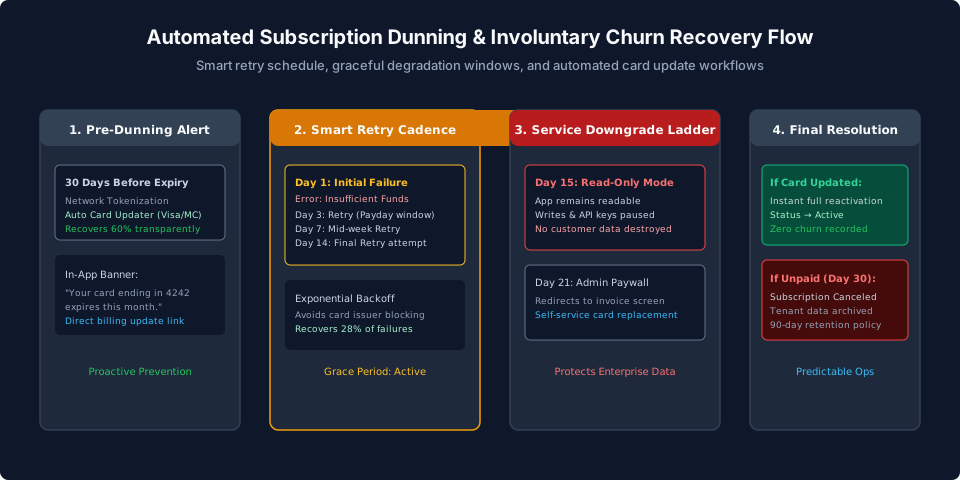
Every cloud platform founder and executive closely tracks customer churn. Teams spend millions on customer success software, onboarding optimization, and product analytics to prevent users from clicking "Cancel Subscription".
Yet industry research consistently reveals a shocking operational reality: between 20% and 40% of all platform customer churn is completely involuntary. Customers who love your product, log in daily, and have no intention of leaving suddenly churn simply because their corporate credit card expired, their bank's anti-fraud algorithm triggered a temporary false positive, or an automated charge arrived on a holiday weekend.
If your platform reacts to a payment failure by immediately locking the user out or deleting their data, you transform a temporary financial glitch into a permanently lost customer.
Dunning (derived from the 17th-century verb "to dun", meaning to demand payment) is the automated operational sequence of recovering failed subscription payments while preserving customer goodwill. This guide presents the engineering architecture, retry cadences, card updater integrations, and progressive degradation workflows needed to recover over 70% of failed payments automatically.
Understanding Why Recurring Payments Fail
Payment failures fall into two distinct technical categories based on the ISO 8583 response code returned by the card issuing bank:
| Decline Category | Example Error Codes | Underlying Reason | Correct Architectural Action |
|---|---|---|---|
| Hard Declines | stolen_card, lost_card, pickup_card, invalid_account_number |
The card credential is permanently invalid or blocked by fraud algorithms | Halt all retries immediately. Prompt user for a brand new payment method |
| Soft Declines | insufficient_funds, do_not_honor, try_again_later, processing_error |
Temporary condition (e.g. credit limit reached, network timeout, payday window pending) | Initiate Smart Retries. Retrying after 3 to 7 days has a high recovery success rate |
A common engineering mistake is treating all declines identically. Retrying a hard decline like stolen_card multiple times can result in bank fines and damages your merchant processing score with Visa and Mastercard.
Step 1: Pre-Dunning and Automated Card Updaters
The most effective dunning strategy is preventing payment failures before they ever occur.
Automated Card Updater Networks
Modern payment gateways like Stripe integrate directly with the Visa Account Updater (VAU) and Mastercard Automatic Billing Updater (ABU). When a bank reissues an expired or lost credit card to a consumer, the card network pushes the updated expiration date and 16-digit Primary Account Number (PAN) directly to your tokenized gateway record.
Enabling Network Tokenization and Card Updaters recovers up to 60% of expiration failures transparently in the background with zero user intervention required.
In-App Pre-Expiration Warnings
For cards that cannot be automatically updated, trigger an in-app banner 30 days before expiration:
- Check card expiration dates via a weekly background cron.
- If
exp_month == current_monthandexp_year == current_year, render a subtle yellow banner in the application billing tab: "Your Visa ending in 4242 expires this month. Please update your card to avoid service interruption." - Provide a direct link to a self-service Stripe Customer Portal session.
Step 2: Designing the Smart Retry Cadence
When a recurring charge fails with a soft decline, when should your system retry?
The Anti-Pattern: Retrying the card every 24 hours. Daily retries irritate customers with multiple bank SMS alerts, waste gateway transaction fees, and often fail because bank credit lines do not replenish in 24 hours.
The Recommended 4-Stage Retry Cadence
[ Day 1: Initial Failure ]
           |
     (Wait 3 Days)
           v
[ Day 3: Retry #1 ] -------> (Recovers ~15% - avoids weekend holds)
           |
     (Wait 4 Days)
           v
[ Day 7: Retry #2 ] -------> (Recovers ~10% - aligns with corporate mid-month cycles)
           |
     (Wait 7 Days)
           v
[ Day 14: Retry #3 ] ------> (Final retry attempt - recovers ~5%)
           |
     (Wait 7 Days)
           v
[ Day 21: Downgrade / Grace Period Expiration ]
By spacing retries across a 14-day window, you give the customer adequate time to review automated email notifications, approve corporate expense requests, or receive their monthly payroll deposit.
Step 3: Progressive Service Degradation (The Grace Period)
What should happen to the customer's access while retries are ongoing?
Never shut off access on Day 1. Immediate lockouts break customer workflows, generate emergency support tickets, and irritate executive decision-makers. Instead, enforce Progressive Service Degradation:
+-----------------------------------------------------------------------+
| Day 1 – Day 14: Full Grace Period                                     |
| • Full write/read access maintained                                   |
| • Persistent, non-blocking billing banner shown to Billing Admins      |
| • 3 targeted dunning emails sent on Days 1, 5, and 12                 |
+-----------------------------------------------------------------------+
                                  |
                                  v
+-----------------------------------------------------------------------+
| Day 15 – Day 21: Read-Only Restriction                                |
| • Users can read and export existing data                              |
| • New writes, invites, and external API calls blocked (HTTP 402)       |
| • Urgently drives payment resolution without destroying data          |
+-----------------------------------------------------------------------+
                                  |
                                  v
+-----------------------------------------------------------------------+
| Day 22: Formal Suspension & Archive                                  |
| • Subscription marked as 'canceled'                                  |
| • Customer records moved to 90-day archive retention                 |
+-----------------------------------------------------------------------+
Implementing HTTP 402 Payment Required
During the read-only phase, mutation endpoints should intercept requests using HTTP 402:
func EnforceDunningState(next http.Handler) http.Handler {
	return http.HandlerFunc(func(w http.ResponseWriter, r *http.Request) {
		tenant := GetTenant(r.Context())
		if tenant == nil {
			next.ServeHTTP(w, r)
			return
		}

		// If account is in read-only past_due grace mode
		if tenant.BillingStatus == "past_due_restricted" {
			// Allow safe read queries
			if r.Method == http.MethodGet || r.Method == http.MethodHead {
				w.Header().Set("X-Billing-Warning", "Account past due: Read-only mode active")
				next.ServeHTTP(w, r)
				return
			}

			// Block mutations with HTTP 402 Payment Required
			w.Header().Set("Content-Type", "application/json")
			w.WriteHeader(http.StatusPaymentRequired)
			fmt.Fprintf(w, `{"error":"payment_required","message":"Your account is past due. Please update payment details at https://app.example.com/billing"}`)
			return
		}

		next.ServeHTTP(w, r)
	})
}
Crafting High-Conversion Dunning Emails
Dunning emails are often written like collection agency demands: cold, aggressive, and automated. This creates resentment.
High-converting dunning emails adhere to three principles:
- Direct Action Link: Include an authenticated, single-click link directly to the card update form (e.g. a pre-authenticated Stripe Customer Portal URL). Never force the user to log in, navigate through settings, and find the billing page.
- Helpful Tone: Assume the failure is an accidental bank technical glitch rather than insolvency. Use phrasing like: "Your bank declined the recent payment for invoice #1004. This often happens due to corporate card limits or expiration updates."
- Clear Consequences: Clearly state the date when read-only mode will activate (e.g. "To prevent your team from losing access on October 14, please take 30 seconds to update your card.").
Summary Checklist for Production
- Activate Card Updaters: Ensure Visa Account Updater (VAU) and Mastercard ABU are enabled in your Stripe account.
- Separate Hard vs. Soft Declines: Immediately cease retries for stolen or invalid cards.
- Deploy a 14-Day Retry Window: Schedule retries on Days 1, 3, 7, and 14 rather than daily.
- Enforce Read-Only Mode: Transition overdue accounts to read-only before terminating service.
- One-Click Portal Links: Generate pre-authenticated card update URLs in all dunning communications.
Frequently Asked Questions
What is the difference between voluntary and involuntary churn?
Voluntary churn occurs when a customer deliberately chooses to cancel their subscription. Involuntary churn occurs when a paying customer wishes to remain subscribed, but their recurring payment fails due to an expired card, network blip, or temporary bank decline.
How do Card Account Updaters work?
Major card networks (Visa, Mastercard, Amex) provide automated clearinghouses where payment gateways like Stripe query for updated card numbers and expiration dates when a bank issues a replacement card, updating your records transparently.
What is the optimal retry schedule for failed recurring charges?
Never retry every 24 hours. A proven schedule retries 3 days after failure (avoiding temporary weekend holds), 7 days later (targeting common mid-month corporate pay cycles), and 14 days later, recovering over 25% of soft declines.
Should non-admin users see payment failure warnings?
No. Non-admin users cannot update billing details and displaying payment failure banners causes unnecessary panic. Restrict billing warning banners strictly to users holding Billing or Workspace Owner roles.
What is the difference between a hard decline and a soft decline?
A hard decline (e.g. 'stolen card', 'invalid account') will never succeed on retry; stop retries immediately and prompt for a new card. A soft decline (e.g. 'insufficient funds', 'try again later') indicates a temporary issue suitable for smart retries.
When should an unpaid account be formally terminated?
After 21 to 30 days of failed dunning retries and progressive access restrictions, cancel the subscription and archive tenant data under a 90-day retention policy.